
Product ∙
Customize Transaction Descriptions
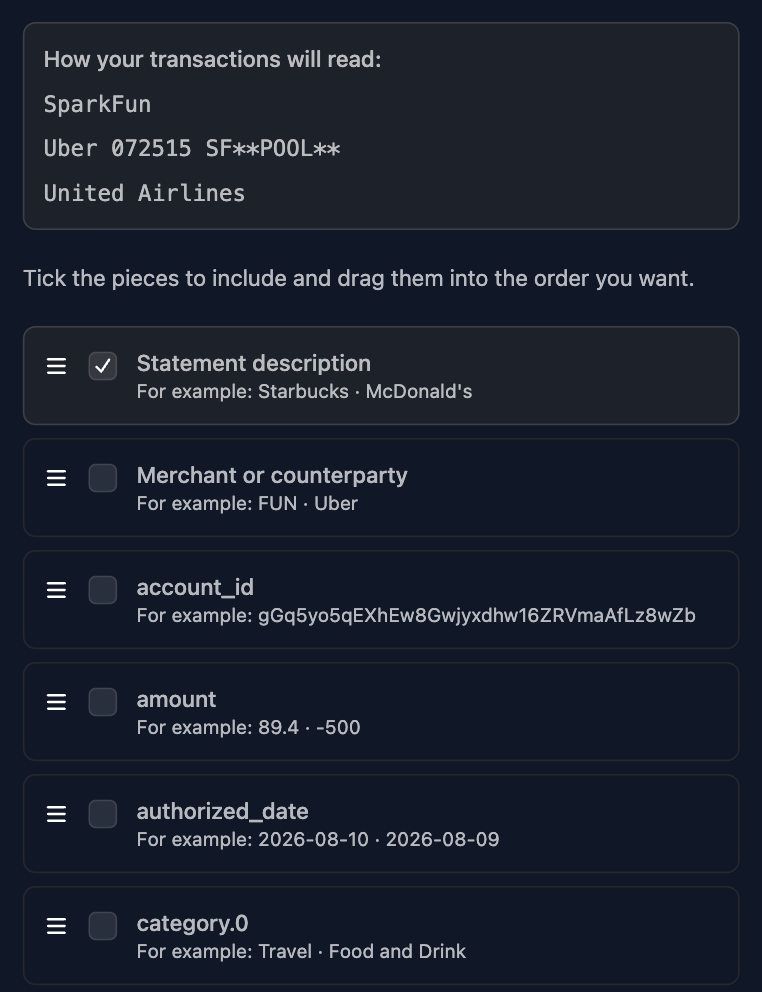
Ever been mystified by your financial transaction descriptions? Struggle to figure out what a transaction on your statement is about?
You can now customize how you wish to display transaction descriptions on your Fintable statement. This is one of those quality-of-life additions that makes Fintable more than just a simple data pusher, and sets us apart from the competition.
The problem with one-size-fits-all
Banks do not agree on what a description is. Some send a single tidy line. Others — American Express, Lloyds, HSBC, First Direct and many more — send several separate fields: their own reference number, the line as it prints on your statement, and the merchant. Fintable joined all of them, so your rows looked like this:
AT262290047000011982490 -- UBER RTD HTTPS://HELP.UB -- UBER MASABI
That leading reference is noise if you are reading a list of card purchases. It is also the exact key some of our customers reconcile invoices by. There is no single right answer, which is why it is now yours to make.
Tick what you want, drag it into order
Go to Connection Settings → Account Settings for any account and find Transaction Description. Untick Bank reference and that Uber row becomes:
UBER RTD HTTPS://HELP.UB -- UBER MASABI
Drag the pieces by their handle to change the order, and the preview at the top shows the finished result on several of your real transactions as you go — so you can see exactly what you are getting before you save.
Everything your bank sends, not just our four fields
The four standard pieces — bank reference, statement description, memo, and merchant or counterparty — mean the same thing on every bank. Below them you will find everything else this particular bank sends on this account: an IBAN, a mandate or reference number, the cardholder name, a purpose code, a merchant website.
That list is read from your own transactions, so it is exactly what your bank
sends and nothing else. Two accounts at the same bank can offer different
fields, and each one comes with real examples, because a field name like
AUT_CNTR_NAM tells you far less than seeing what is actually in it.
The details
Saving updates the transactions Fintable has already stored, so your dashboard reflects the change straight away. Airtable needs a Force Re-Sync to rewrite rows it has already written — new transactions arrive with the new wording either way.
If you never touch this, nothing changes: every account keeps exactly the description it has always had.
It is in the API too, as description_parts on an
account — examples included. So you can also just ask Claude or ChatGPT what a
field contains and have it set this up for you.
Full details are in the User Guide.